Boo 2026
Summary
I built Boo at Ghost, a marketplace for surplus retail inventory. Each supplier sends its inventory in a different file format.
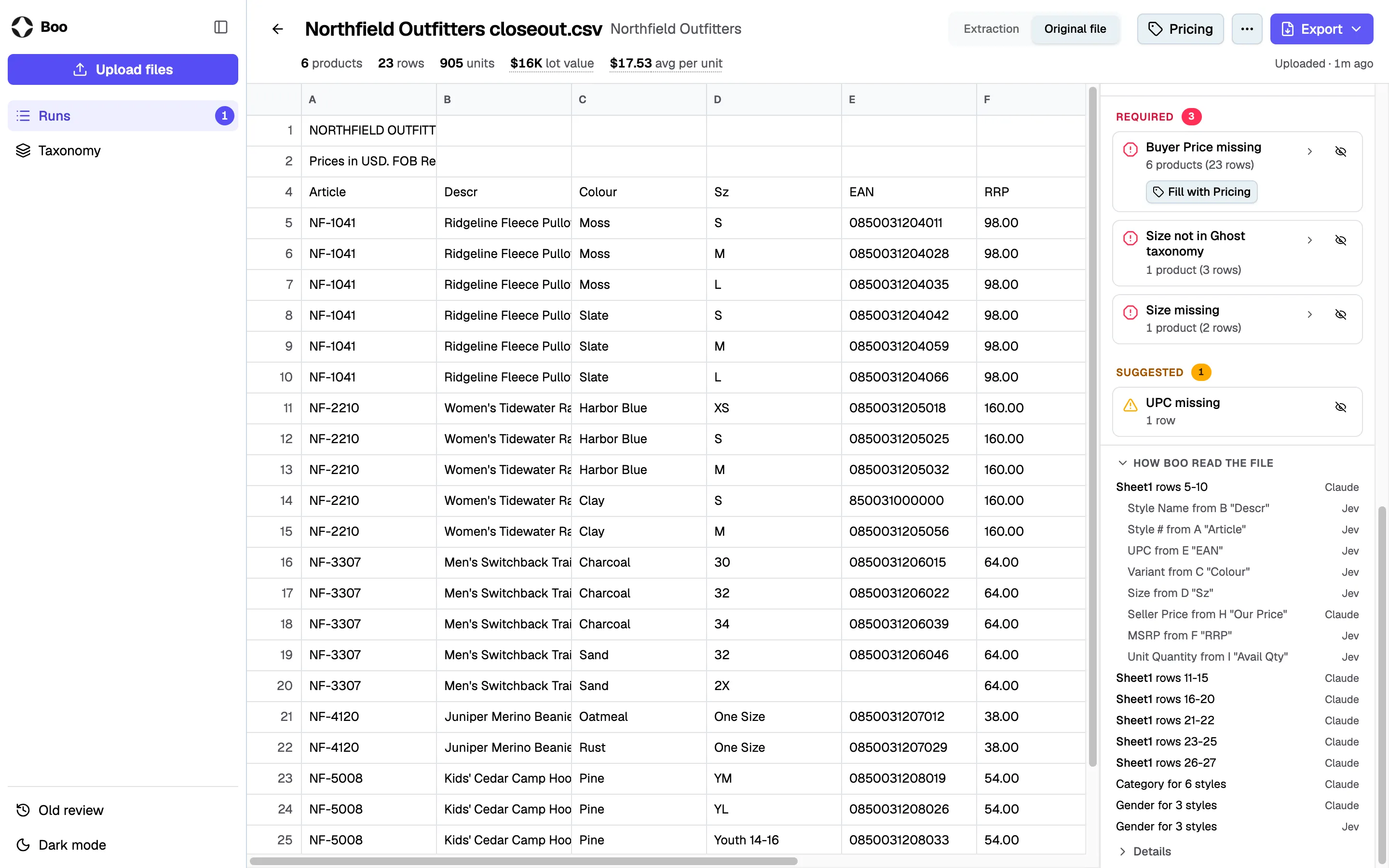
Boo reads the file and maps each value to a field in Ghost's taxonomy. An LLM writes the rules for how to read the file, and code applies those rules to every row. A decision model then infers the fields the supplier left out, such as Category and Gender, from the details in the file. A person checks the result, and the items are listed on the marketplace.
Boo has been in production since March 2026, and Ghost's operations team has run it on more than 870 supplier files.
Background
No two supplier files look the same.
- LayoutTitle rows sit above the header, or one file holds several tables and tabs.
Supplier's file A B C D 1 NORTHFIELD OUTFITTERS 2 Closeout list, October 3 4 Article Descr Colour Qty 5 SGB-296 Re-Nylon Jacket Black 36 After Boo A B C D 1 Style # Style Name Variant Unit Quantity 2 SGB-296 Re-Nylon Jacket Black 36 - Column namesA supplier writes "Descr", "Sz" and "RRP" for Style Name, Size and MSRP.
Supplier's file A B C D 1 Article Descr Sz RRP 2 SGB-296 Re-Nylon Jacket 48 2150.00 3 SGB-296 Re-Nylon Jacket 50 2150.00 After Boo A B C D 1 Style # Style Name Size MSRP 2 SGB-296 Re-Nylon Jacket 48 2150.00 3 SGB-296 Re-Nylon Jacket 50 2150.00 - SizesOne file has a row for each size. The next has a column for each size.
Supplier's file A B C D E 1 Article Descr 46 48 50 2 SGB-296 Re-Nylon Jacket 12 36 24 3 SGB-410 Re-Nylon Vest 8 20 16 After Boo A B C D 1 Style # Style Name Size Unit Quantity 2 SGB-296 Re-Nylon Jacket 46 12 3 SGB-296 Re-Nylon Jacket 48 36 4 SGB-296 Re-Nylon Jacket 50 24 5 SGB-410 Re-Nylon Vest 46 8 - Extra rowsSubtotals, totals and notes sit between the item rows.
Supplier's file A B C 1 SGB-296 Re-Nylon Jacket 36 2 SGB-410 Re-Nylon Vest 20 3 Subtotal 56 4 2HC-137 Re-Nylon Bucket Hat 18 5 TOTAL 74 After Boo A B C 1 SGB-296 Re-Nylon Jacket 36 2 SGB-410 Re-Nylon Vest 20 3 2HC-137 Re-Nylon Bucket Hat 18 - Bad or missing valuesA barcode arrives in scientific notation, or the file has no Category or Gender.
Supplier's file A B C 1 Article EAN Category 2 SGB-296 8500310004127 empty 3 SGB-410 8.50031E+12 empty After Boo A B C 1 Style # UPC Category 2 SGB-296 8500310004127 Outerwear 3 SGB-410 8.50031E+12 Outerwear
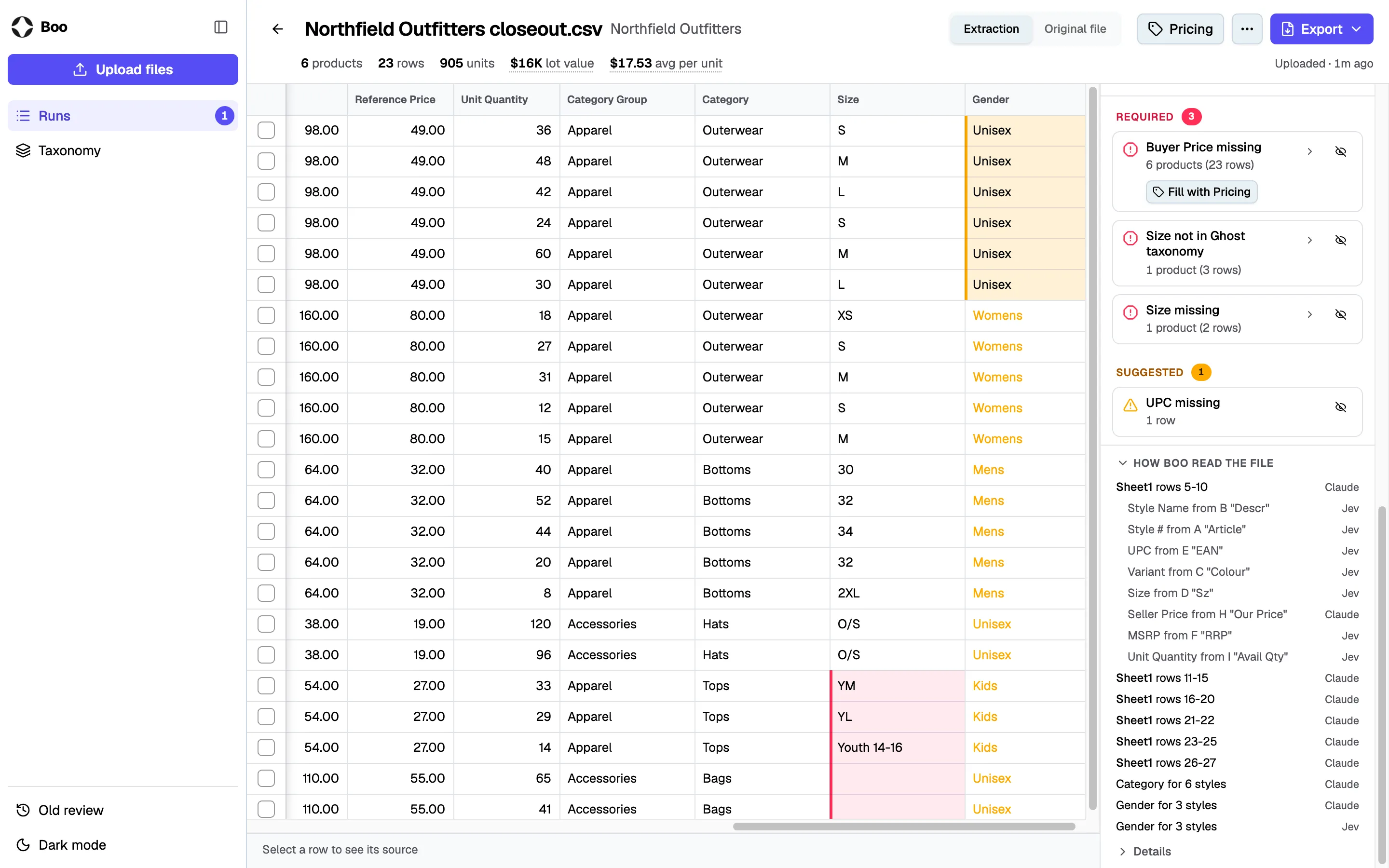
This is a whole sample file as it arrives. It has four of the five.
How it works
- CodeReads every tab and row and summarizes each column
- LLMWrites the rules for this file
- Decision modelChecks which field each column holds
- CodeApplies the rules to every row
- Decision modelPicks Category and Gender once per product
- PersonChecks the flagged cells before the items are listed
Reading the file
Claude Sonnet reads each file one time and writes a set of rules for it. The rules cover four things.
- Tabs and rows. Which tabs to read, where each table starts, and which rows are items.
- Fields. How to build each field. A field can come from one column, part of a column, or several columns joined.
- Sizes. Whether the file has a row for each size or a column for each size.
- Values. Which of the supplier's words map to Ghost's words, and which currency the prices are in.
A decision model then checks each column choice. A decision model answers a multiple-choice question with one choice and a confidence from 0 to 1. Boo uses Jev, from TypeSafe. When Jev picks a different column at 0.9 or more, its choice replaces Claude's.
Code then applies the rules to every row, so every row in the file is read the same way.
Filling in missing fields
When a file has no Category or Gender, Jev picks them. For Category, it reads the name of the product. For Gender, it reads the brand, the name, the Category and the sizes.
Jev answers once for each product. A product is a brand and a style number, and its items are the sizes and colors. A jacket in two colors and three sizes is six items and one question. Code writes the answer to all six items.
In 372 past files, 248,388 items made 52,434 products. That is 4.7 times fewer questions. The cost is that one wrong answer gets applied to every item of that product.
Boo uses the confidence to decide what to do with each answer.
- 0.9 or more. Boo applies the answer.
- 0.5 to 0.9. Boo applies the answer and marks the cell amber for the reviewer.
- Below 0.5. Boo leaves the field empty for the reviewer.
Review
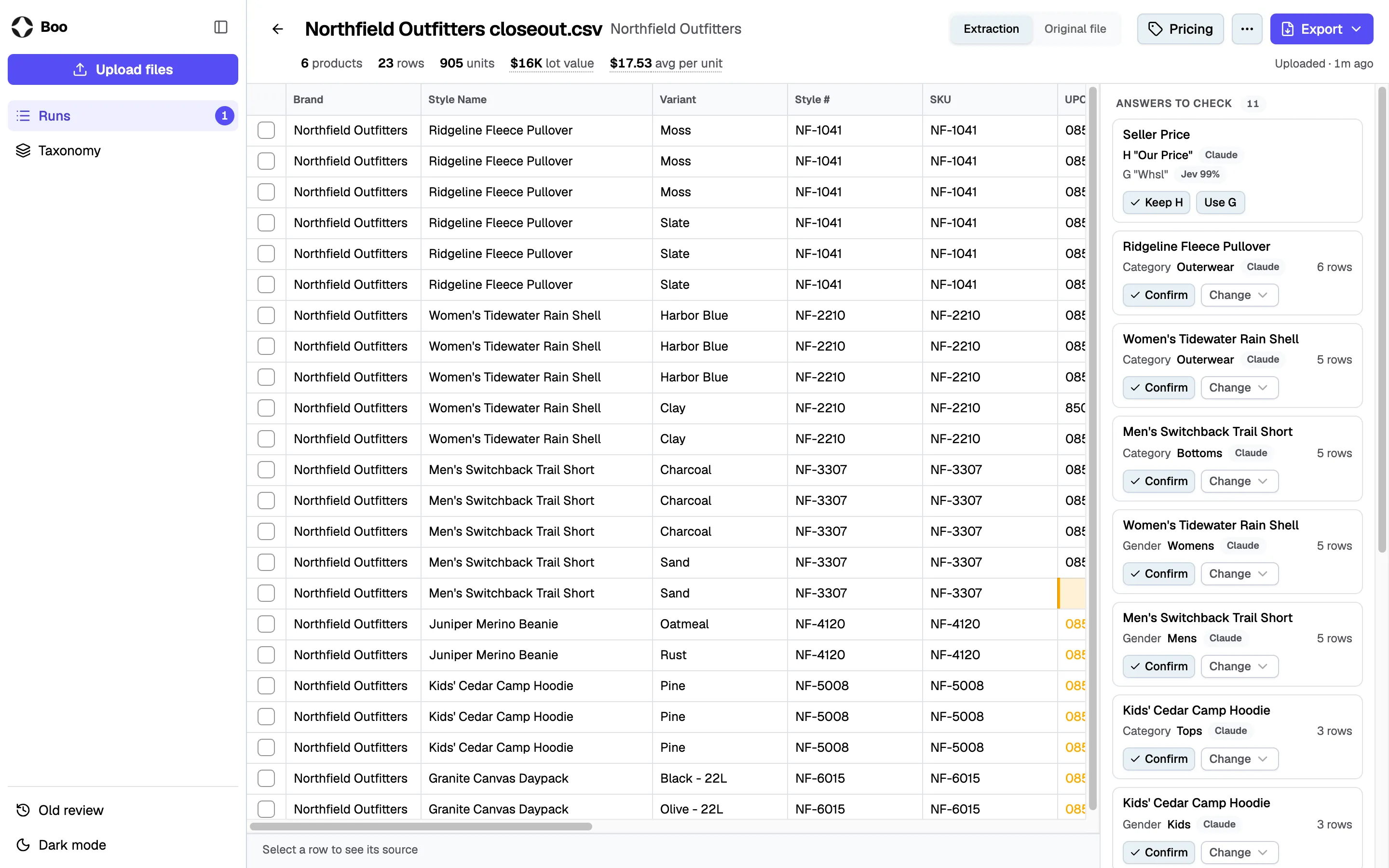
A reviewer checks every file before the items are listed. I built the review screen as a grid of the mapped rows, with a list of issues beside it.
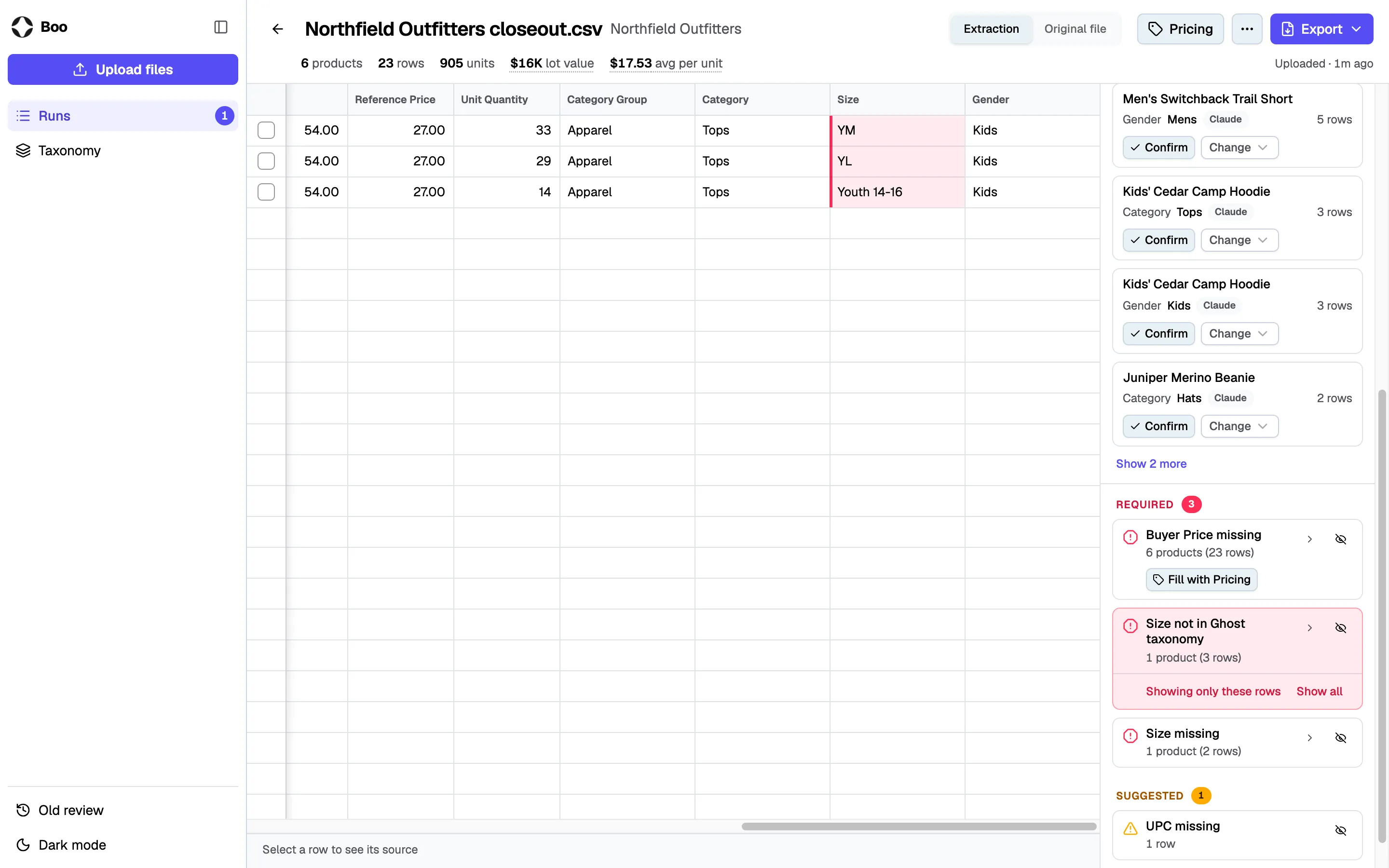
In the sample file, three rows have the sizes YM, YL and Youth 14-16. Those sizes are not in the taxonomy. Boo marks the three cells red and lists one issue, "Size not in Ghost taxonomy". A click on the issue filters the grid to those three rows.
Boo uses two colors.
- Red. The upload rejects the value. It breaks an upload rule, or it is not in the taxonomy.
- Amber. Jev was not sure of the value, or a recommended field is empty.
Results
The team has run Boo on more than 870 supplier files since it went into production in March 2026. It replaced a vendor's tool on a monthly contract.
- Vendor's tool$11,000Monthly contract of about $11,000
- Boo$31Claude Sonnet $29, Jev $2
- Saved$10,96999.7% less
Supplier files run with Boo, May to September 2026
- 194May
- 159June
- 149July
- 129August
- 189September
Learnings
- Items of one product share a Category and a Gender. Asking once per product cut the questions to the model by 4.7 times.
- With the recent introduction of decision models like Jev, the multiple-choice questions go to a decision model. The LLM does the open-ended work, which is writing the rules for each file.
- Asking once per product has a cost. One wrong Category lands on every item of that product.
- Boo cuts the check down to the flagged cells, and a person still checks every file.